Tutorials
Build a hackathon demo chatbot with an LLM API in an afternoon
Build a working AI hackathon chatbot with a Python API and one web page. Includes a five-question test and a list of what to cut when time runs short.
By Starfield LabsPublished Beginner180 min

Before you start
- Python basics
- Python 3.10 or newer
- A browser
- An Anthropic API key
You build a small web chatbot: a Python backend that calls a language model API, and one HTML page that talks to it. The backend serves the page, so there is one thing to run.
Time: about three hours. Level: beginner. You need: Python basics, Python 3.10 or newer, a browser, and an Anthropic API key. Tested: 10 November 2026 with Python 3.14.6, anthropic 2.7.0, fastapi 0.162.2 and uvicorn 0.54.0 on macOS.
Model replies differ from run to run. Your answers will not match the ones below word for word.
A chatbot is a project you can build in an afternoon, which suits the short time of an AI hackathon. See the upcoming AI hackathons to find an event to build it for.
Why this matters
A demo has to work on stage, with a short build time and a short list of moving parts. This design has three files that matter: a script for the model call, a backend, and a page. Each can be checked on its own before the next is added. That is what keeps an afternoon build from turning into an evening of debugging.
See it running first
This is the finished page, opened with a question already sent. The question and the answer are real output of the backend.
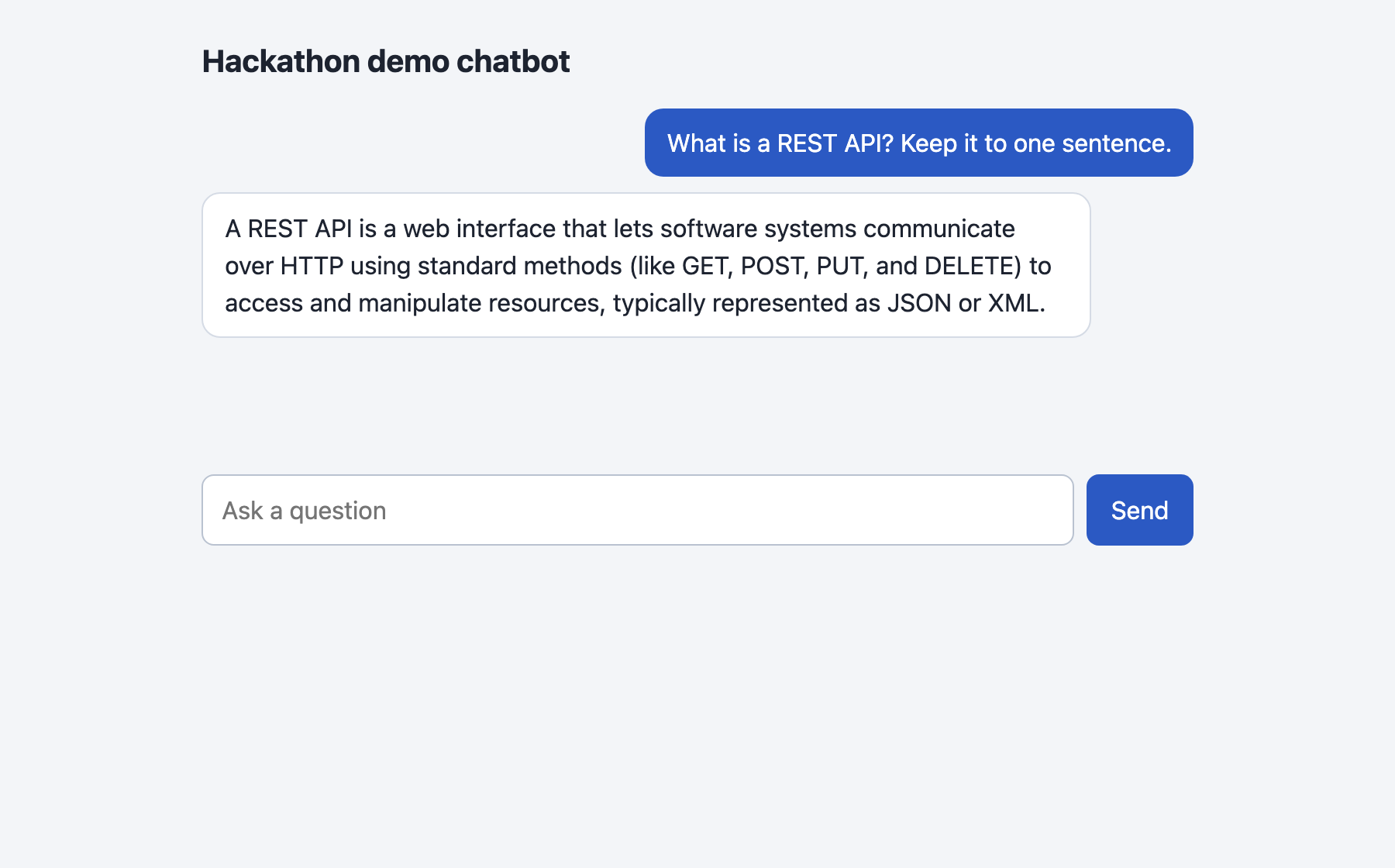
The rest of the tutorial builds it from nothing.
Step 1: Set up the project and the key
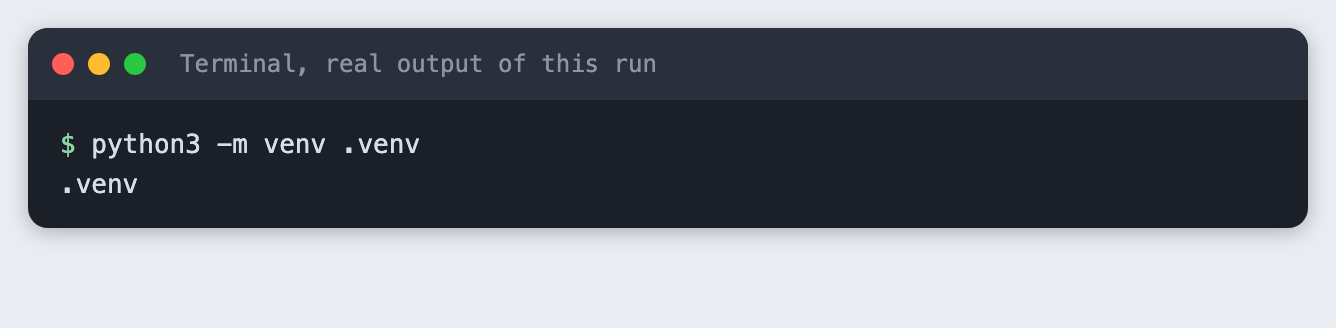
Make a folder, create a virtual environment and activate it. The commands from here on assume it is active.
python3 -m venv .venv
Create requirements.txt:
anthropic>=2.7.0
fastapi>=0.115
uvicorn>=0.30
File: requirements.txt
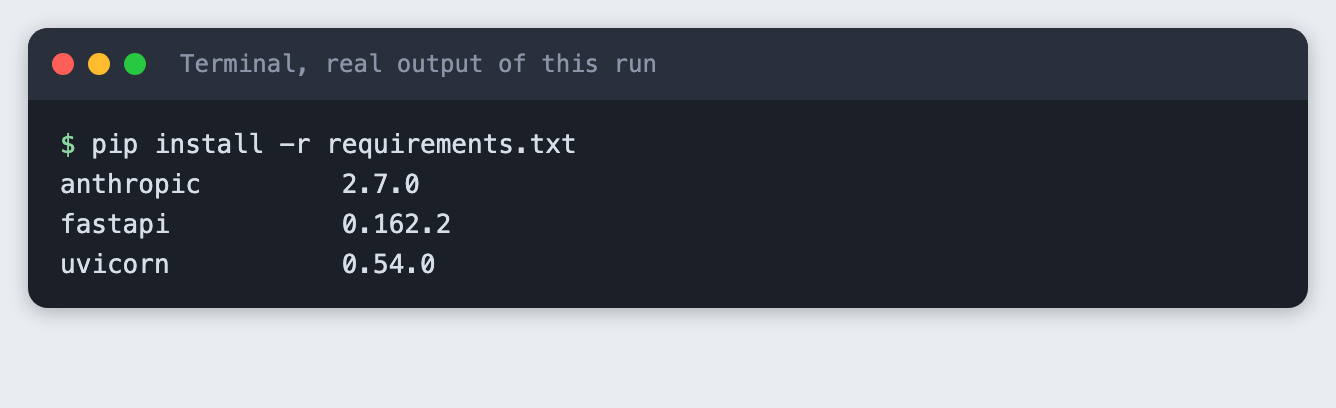
Install it. The output lists the versions used for this tutorial.
pip install -r requirements.txt
Put your key in a file named .env in the project folder. Copy the placeholder file and edit it:
ANTHROPIC_API_KEY=your_key_here
File: .env.example
Never paste a real key into code, a screenshot or a chat. Add .env to .gitignore if you use git. Load the file into your terminal session (macOS and Linux):
set -a; source .env; set +a
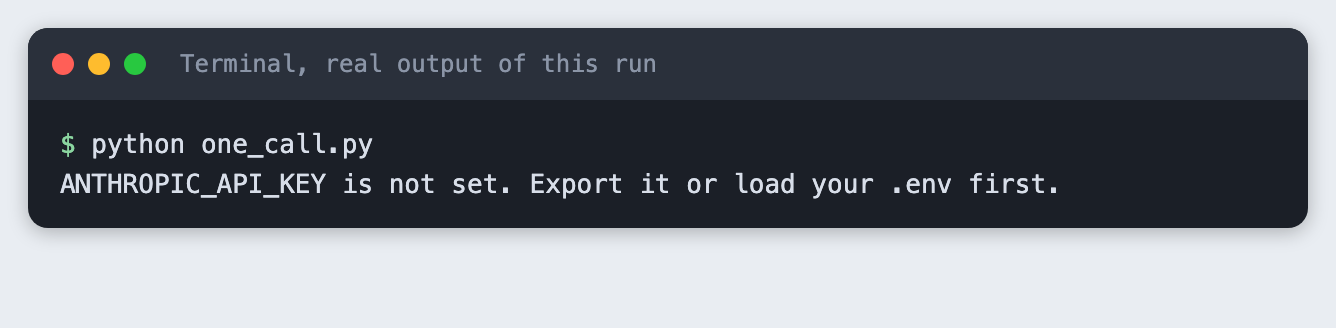
You can also run export ANTHROPIC_API_KEY=... yourself. The code reads the variable from the environment. If it is missing, the script stops with a message. This is what that looks like:
Step 2: Make one call
Before any web code, prove the model call works. one_call.py sends one message and prints the reply and the token counts from response.usage. The model name and max_tokens sit in constants at the top. Keep max_tokens low for a demo: it caps the cost of one reply and the time a visitor waits.
import os
import sys

from anthropic import Anthropic

from spend_log import log_usage

MODEL = "claude-haiku-5-5"
MAX_TOKENS = 200

if not os.environ.get("ANTHROPIC_API_KEY"):
    sys.exit("ANTHROPIC_API_KEY is not set. Export it or load your .env first.")

client = Anthropic()  # reads ANTHROPIC_API_KEY from the environment

response = client.messages.create(
    model=MODEL,
    max_tokens=MAX_TOKENS,
    messages=[{"role": "user", "content": "Suggest a name for a hackathon chatbot that answers questions about recycling. Reply with the name only."}],
)
log_usage("one_call.py", response)

# A reply is a list of blocks. Join the text blocks.
print("reply:", "".join(block.text for block in response.content if block.type == "text"))
print("input tokens:", response.usage.input_tokens)
print("output tokens:", response.usage.output_tokens)
File: one_call.py
python one_call.py
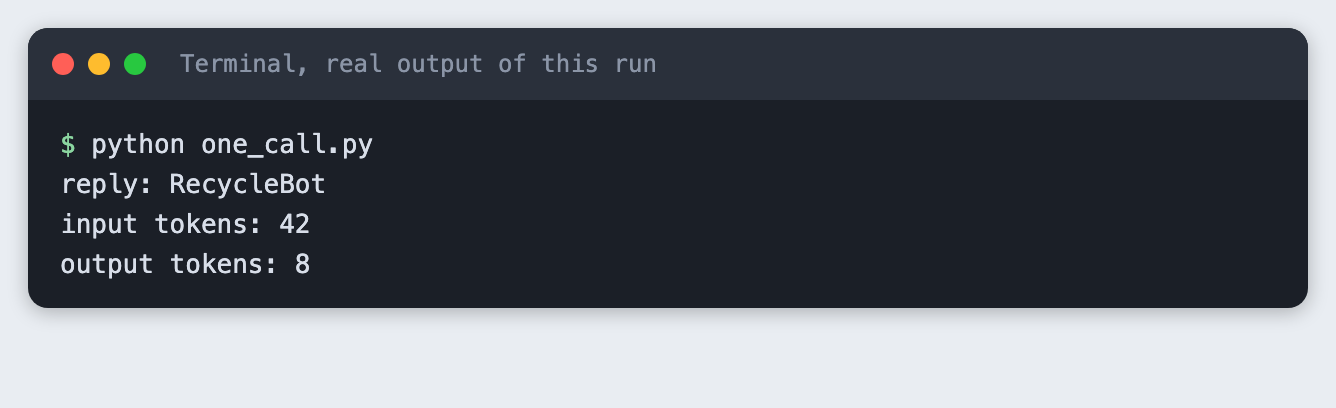
In this run the call used 42 input tokens and 8 output tokens. Yours will be close, not identical. If this step fails, fix it here. The web code cannot work without it.
Step 3: Wrap the call in a web API
app.py is a FastAPI app with three routes. POST /chat takes a message and the earlier turns and returns the reply. GET /health answers when the server is up. GET / serves the page.
Two choices are worth a sentence each. The server keeps no conversation state: the page sends the history with every message, which means there is nothing to lose when you restart the server mid-demo. And if the model call fails, the browser gets a short fixed message, not the provider's error text.
The ?ask= option on GET / opens the page with one question already answered. It exists so a screenshot tool can capture a finished conversation. Normal use is the form on the page.
import json
import os
import sys
from functools import lru_cache
from pathlib import Path
from typing import Literal

import anthropic
from fastapi import FastAPI, HTTPException, Query
from fastapi.responses import HTMLResponse
from pydantic import BaseModel, Field

from spend_log import log_usage

MODEL = "claude-haiku-5-5"
MAX_TOKENS = 300
SYSTEM = "You are the helper bot in a hackathon demo. Answer in at most three short sentences."
PAGE = Path(__file__).with_name("index.html")

if not os.environ.get("ANTHROPIC_API_KEY"):
    sys.exit("ANTHROPIC_API_KEY is not set. Export it or load your .env first.")

client = anthropic.Anthropic()
app = FastAPI()


class Turn(BaseModel):
    role: Literal["user", "assistant"]
    content: str


class ChatRequest(BaseModel):
    message: str = Field(min_length=1, max_length=500)
    history: list[Turn] = Field(default=[], max_length=20)


@app.get("/health")
def health():
    return {"ok": True}


@app.post("/chat")
def chat(req: ChatRequest):
    messages = [turn.model_dump() for turn in req.history]
    messages.append({"role": "user", "content": req.message})
    try:
        response = client.messages.create(model=MODEL, max_tokens=MAX_TOKENS, system=SYSTEM, messages=messages)
    except anthropic.APIError:
        # Do not pass the provider's error text to the browser.
        raise HTTPException(status_code=502, detail="The model call failed. Check the server log.")
    log_usage("app.py", response)
    return {"reply": "".join(block.text for block in response.content if block.type == "text")}


@lru_cache
def demo_reply(question: str) -> str:
    return chat(ChatRequest(message=question))["reply"]


@app.get("/", response_class=HTMLResponse)
def index(ask: str = Query("", max_length=500)):
    # /?ask=... opens the page with one finished exchange, so a screenshot tool
    # can capture a conversation. Normal use is the form on the page.
    start = [{"role": "user", "content": ask}, {"role": "assistant", "content": demo_reply(ask)}] if ask else []
    return PAGE.read_text().replace("__START__", json.dumps(start).replace("<", "\\u003c"))
File: app.py
Start it in one terminal. The --port 8031 choice is yours, any free port works:
uvicorn app:app --port 8031
Step 4: Add the page
index.html is plain HTML and JavaScript with no build step. It keeps the history in a JavaScript array, posts to /chat, and adds each message to the page. It uses textContent, not innerHTML, so a model reply is shown as text and never run as markup. The same file is served by the backend, so there is no cross-origin setup.
<!doctype html>
<html lang="en">
<head>
<meta charset="utf-8">
<meta name="viewport" content="width=device-width, initial-scale=1">
<title>Hackathon demo chatbot</title>
<style>
  body { font: 16px/1.5 system-ui, sans-serif; background: #f3f5f8; margin: 0; color: #1d2330; }
  main { max-width: 640px; margin: 0 auto; padding: 24px 16px; }
  h1 { font-size: 20px; margin: 0 0 16px; }
  #log { display: flex; flex-direction: column; gap: 10px; min-height: 220px; }
  .msg { padding: 10px 14px; border-radius: 12px; max-width: 85%; white-space: pre-wrap; }
  .user { align-self: flex-end; background: #2b59c3; color: #fff; }
  .assistant { align-self: flex-start; background: #fff; border: 1px solid #d5dbe5; }
  .error { align-self: flex-start; background: #fde8e8; border: 1px solid #f0b4b4; }
  form { display: flex; gap: 8px; margin-top: 16px; }
  input { flex: 1; padding: 10px 12px; font: inherit; border: 1px solid #b9c2d0; border-radius: 8px; }
  button { padding: 10px 16px; font: inherit; border: 0; border-radius: 8px; background: #2b59c3; color: #fff; cursor: pointer; }
  button:disabled { opacity: 0.6; cursor: wait; }
</style>
</head>
<body>
<main>
  <h1>Hackathon demo chatbot</h1>
  <div id="log"></div>
  <form id="form">
    <input id="text" autocomplete="off" maxlength="500" placeholder="Ask a question" required>
    <button id="send">Send</button>
  </form>
</main>
<script>
  const history = __START__;
  const log = document.getElementById("log");
  const form = document.getElementById("form");
  const text = document.getElementById("text");
  const send = document.getElementById("send");

  function show(role, content) {
    const div = document.createElement("div");
    div.className = "msg " + role;
    div.textContent = content; // textContent, so model output is never run as HTML
    log.appendChild(div);
  }

  history.forEach(turn => show(turn.role, turn.content));

  form.addEventListener("submit", async (event) => {
    event.preventDefault();
    const message = text.value.trim();
    if (!message) return;
    text.value = "";
    send.disabled = true;
    show("user", message);
    try {
      const res = await fetch("/chat", {
        method: "POST",
        headers: { "Content-Type": "application/json" },
        body: JSON.stringify({ message, history }),
      });
      if (!res.ok) throw new Error("Server said " + res.status);
      const data = await res.json();
      history.push({ role: "user", content: message }, { role: "assistant", content: data.reply });
      show("assistant", data.reply);
    } catch (err) {
      show("error", "Something went wrong: " + err.message);
    }
    send.disabled = false;
    text.focus();
  });
</script>
</body>
</html>
File: index.html
Open http://127.0.0.1:8031/ in your browser, type a question and press Send. The screenshot at the top of this article shows the page after one exchange. I did not drive the Send button in a browser for this tutorial; the same /chat route was exercised by the test in the next step.
Step 5: Test with five questions
A demo fails on the question you did not try. test_questions.py sends five questions to the running server and checks that each gets a non-empty answer. Keep the server from Step 3 running and run this in a second terminal:
import json
import sys
import textwrap
import time
import urllib.request

BASE = "http://127.0.0.1:8031"
QUESTIONS = [
    "What is a REST API? Keep it to one sentence.",
    "Suggest a name for a chatbot about recycling.",
    "Name one thing that can go wrong in a live demo.",
    "How do I say good morning in Spanish?",
    "What is a vector database, in one sentence?",
]


def wait_for_server(seconds=30):
    end = time.time() + seconds
    while time.time() < end:
        try:
            urllib.request.urlopen(BASE + "/health", timeout=2).read()
            return
        except OSError:
            time.sleep(0.5)
    sys.exit("The server did not answer on " + BASE)


def ask(question):
    body = json.dumps({"message": question}).encode()
    request = urllib.request.Request(BASE + "/chat", body, {"Content-Type": "application/json"})
    with urllib.request.urlopen(request, timeout=60) as res:
        return json.loads(res.read())["reply"]


wait_for_server()
answered = 0
for number, question in enumerate(QUESTIONS, 1):
    reply = ask(question)
    print(f"{number}. Q: {question}")
    print(textwrap.fill(reply, width=100, initial_indent="   A: ", subsequent_indent="      "))
    if reply.strip():
        answered += 1
print(f"{answered} of {len(QUESTIONS)} questions answered")
sys.exit(0 if answered == len(QUESTIONS) else 1)
File: test_questions.py
python test_questions.py
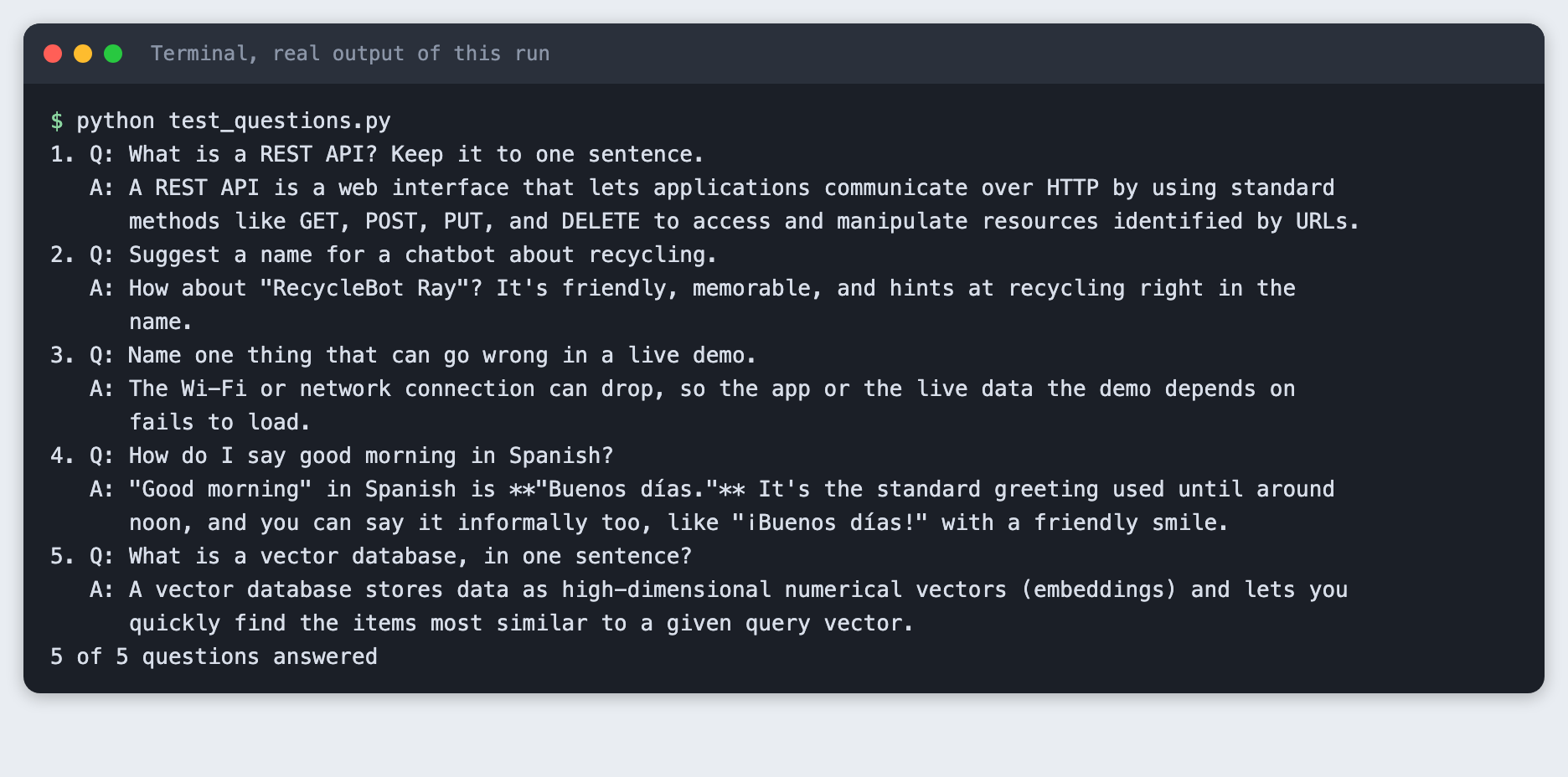
All five questions were answered in this run, and the script printed 5 of 5 questions answered. The script checks that an answer exists. It does not check that the answer is correct, so read them yourself. In this run the answer to question four contains ** marks. The model wrote them as Markdown bold, and the page shows model text as plain text, so they appear as stars. You can strip them or add a Markdown renderer.
What to cut when time runs short
Cut in this order, from the part that matters least to the demo:
- The
?ask=shortcut and the/healthroute. The chat works without them. - The history. Send only the latest message and the bot answers each question alone.
- The page. Show the
test_questions.pyoutput on a projector. It is a working demo of the backend. - Never cut the single-call script from Step 2. It is the fallback when everything else breaks.
Troubleshooting
ANTHROPIC_API_KEY is not setwhen startinguvicorn. Load the key in the same terminal you start the server from, then start it again.Address already in use. An old server is still running on port 8031. Stop it or pick another port, and changeBASEintest_questions.pyto match.- The test script says the server did not answer. Start the server in the first terminal and check it prints no error. The script waits 30 seconds.
- The page shows "Something went wrong". Look at the terminal where
uvicornruns. The browser only gets a short message by design. - An authentication error from the API. The key is wrong or revoked. Create a new one and update
.env.
Frequently asked questions
Is a chatbot a good AI hackathon project for beginners?
The tutorial is rated beginner and takes about three hours. It has three files that matter, and each can be checked alone. Not tested here: a run with real beginners.
How do I keep an AI hackathon chatbot demo from breaking on stage?
Keep the single-call script from Step 2 as a fallback. Test with several questions: all five were answered in this run. The server keeps no conversation state, and the browser gets a short fixed message when the model call fails.
Which features should I cut when time runs out?
Cut in this order: the ?ask= shortcut and the /health route, then the history, then the page. Never cut the single-call script.
What to try next
- Add a system prompt that gives the bot a personality that fits your demo.
- Stream the reply so text appears as it is written.
- Trim the history to the last few turns so long chats stay cheap.
How this tutorial was tested
- Date: 10 November 2026. Python 3.14.6,
anthropic2.7.0,fastapi0.162.2,uvicorn0.54.0, macOS. The model isclaude-haiku-5-5, set in theMODELconstant. - The code in this article is copied from the project files by a script. The output and screenshots come from saved logs of real API calls.
- Every step was run from a clean folder, then replayed from an empty copy of the folder with no virtual environment. The replay passed. Model replies differed between the two runs, as expected.
- The page screenshot is a real Chrome screenshot of the running page. Terminal screenshots are rendered from the saved output of the run. They are not captures of a terminal window.
- Not run: typing into the page and pressing Send in a browser, Windows, Linux, and Python versions other than 3.14.6. The
source .envline is for macOS and Linux shells.