Tutorials
Build an agent that answers questions about a code repo in Python
AI hackathon agent guide: answer questions about a GitHub repo. Give it read tools, answer with file paths and limit what it can read.
By Starfield LabsPublished Intermediate45 min

Before you start
- Python basics
- Python 3.10 or newer
- An Anthropic API key
You build an agent that reads files from a small code repository and answers questions about it with file names. It has three read-only tools. Every path it asks for is checked against one folder, and a request to read outside that folder is refused by your code.
Time: about 45 minutes. Level: intermediate. You need: Python basics, Python 3.10 or newer, and an Anthropic API key. Tested: 11 November 2026 with Python 3.14.6 and the anthropic package 2.8.0 on macOS.
Model replies differ from run to run. Your wording, and which tools the agent calls first, will not match the output below exactly. The shape of the output will.
Agents are popular in AI hackathons, and an agent that can only read is a safe place to start. If you plan to build one, see the upcoming AI hackathons. The project here uses a small repo that lives inside the tutorial folder, so you need no GitHub login or token. The same code works on a folder you cloned yourself.
Why this matters
An agent is a loop. The model asks for a tool, your code runs it and sends the result back, and the model decides what to do next. The model never touches your disk. Your code does, so your code decides what is allowed. This tutorial gives the agent a read tool and then limits it, because the limit is the part that is easy to get wrong.
See it running first
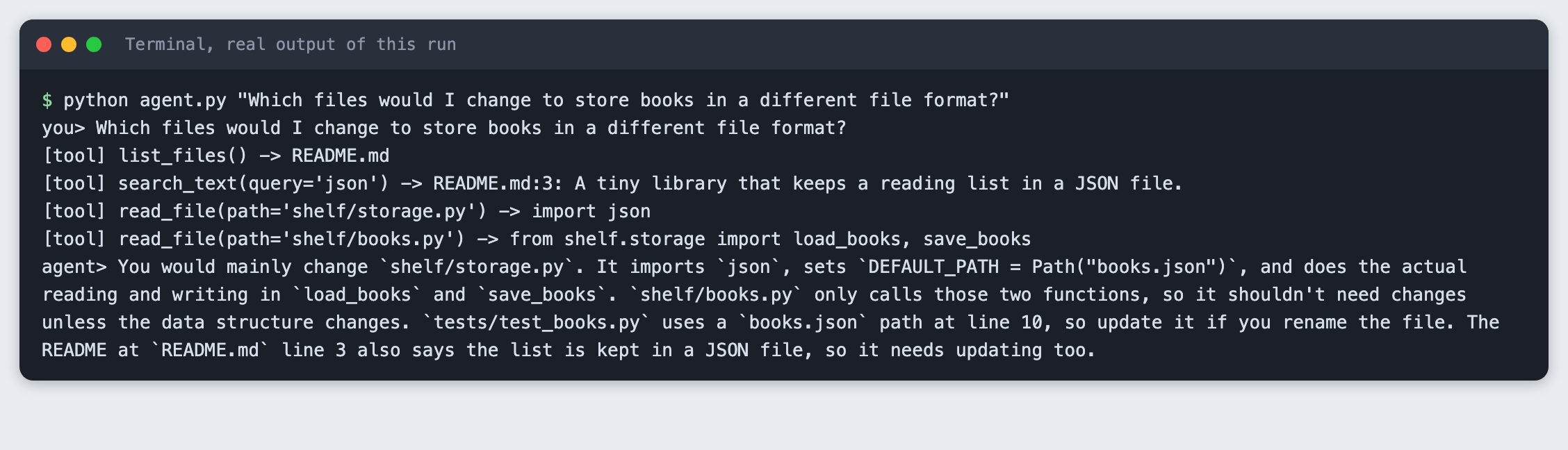
This is the finished agent answering a question about a sample repo. It lists and reads files, then names the file that holds the answer.
The rest of the tutorial builds it from nothing.
Step 1: Set up the project
Make a folder, create a virtual environment and activate it. The commands from here on assume it is active.
python3 -m venv .venv
Create requirements.txt with one line:
anthropic>=2.7.0
File: requirements.txt
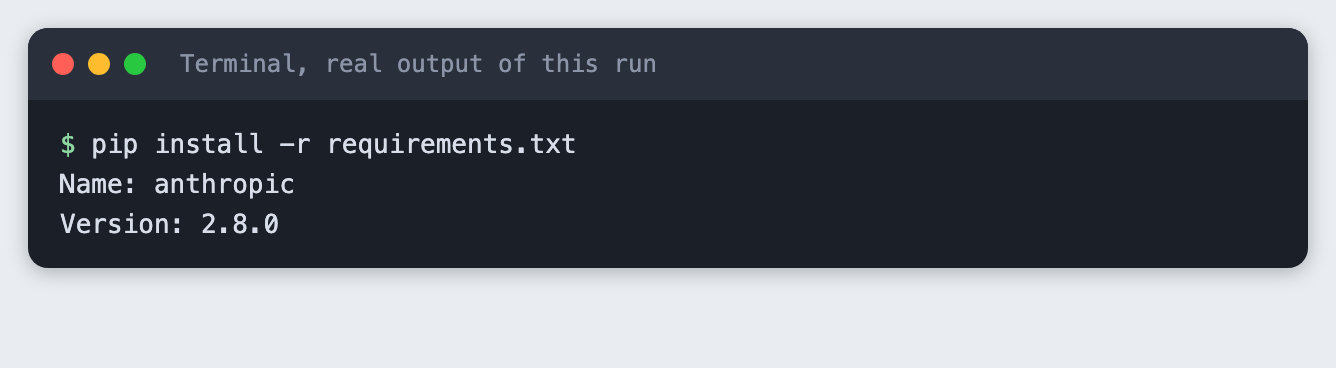
Install it. The output below shows the version used for this tutorial.
pip install -r requirements.txt
Put your key in a .env file. Copy the placeholder file and edit it. Never paste a real key into code or a screenshot.
ANTHROPIC_API_KEY=your_key_here
File: .env.example
Load it into your terminal session (macOS and Linux) with set -a; source .env; set +a.
Step 2: Write a tiny repo to ask about
The agent needs something to read. sample_repo/ is a small library called shelf that keeps a reading list in a JSON file. It is written for this tutorial, so there is no third-party code in it. It has six files:
import json
from pathlib import Path

DEFAULT_PATH = Path("books.json")


def load_books(path=DEFAULT_PATH):
    """Return the list of books, or an empty list if the file does not exist."""
    if not Path(path).exists():
        return []
    return json.loads(Path(path).read_text())


def save_books(books, path=DEFAULT_PATH):
    """Write the list of books to disk as JSON."""
    Path(path).write_text(json.dumps(books, indent=2))
File: sample_repo/shelf/storage.py
from shelf.storage import load_books, save_books

MAX_TITLE_LENGTH = 80


def add_book(title, author, path=None):
    """Add a book. Raises ValueError if the title is empty or longer than 80 characters."""
    title = title.strip()
    if not title or len(title) > MAX_TITLE_LENGTH:
        raise ValueError("title must be 1 to 80 characters")
    books = load_books(path) if path else load_books()
    books.append({"title": title, "author": author.strip(), "read": False})
    save_books(books, path) if path else save_books(books)
    return books[-1]


def mark_read(title, path=None):
    """Mark the first book with this title as read. Returns False if no book matches."""
    books = load_books(path) if path else load_books()
    for book in books:
        if book["title"] == title:
            book["read"] = True
            save_books(books, path) if path else save_books(books)
            return True
    return False
File: sample_repo/shelf/books.py
The other four files are README.md, shelf/__init__.py, shelf/cli.py and tests/test_books.py. There is also a folder next to the repo, private/, with a file called notes.txt. It is outside the repo on purpose. It stands for anything on your machine the agent should not see.
Step 3: Give the agent read tools
repo_tools.py holds three tools: list_files, read_file and search_text. All of them are read-only. None can write, delete or run anything.
The check that matters is _safe. It joins the requested path to the repo folder, resolves it (that follows .. and symlinks), and refuses the result if it is not inside the folder. list_files and search_text skip files whose real location is outside the folder too. The tool returns the refusal as text, so the model can read it and explain.
"""Read-only tools for the agent. Every path is checked against one repo folder."""
from pathlib import Path

MAX_FILE_CHARS = 4000
MAX_MATCHES = 20


class RefusedPath(Exception):
    """Raised when a path points outside the repo folder."""


class RepoTools:
    def __init__(self, repo):
        self.root = Path(repo).resolve()

    def _safe(self, relative):
        """Resolve a path (following symlinks) and refuse it if it leaves the repo folder."""
        target = (self.root / relative).resolve()
        if not target.is_relative_to(self.root):
            raise RefusedPath(f"refused: '{relative}' is outside the repo folder")
        return target

    def _files(self):
        return sorted(
            p for p in self.root.rglob("*")
            if p.is_file() and "__pycache__" not in p.parts and p.resolve().is_relative_to(self.root)
        )

    def list_files(self):
        return "\n".join(str(p.relative_to(self.root)) for p in self._files())

    def read_file(self, path):
        target = self._safe(path)
        if not target.is_file():
            return f"error: '{path}' is not a file in the repo"
        text = target.read_text(errors="replace")
        if len(text) > MAX_FILE_CHARS:
            text = text[:MAX_FILE_CHARS] + "\n[truncated]"
        return text

    def search_text(self, query):
        matches = []
        for p in self._files():
            for number, line in enumerate(p.read_text(errors="replace").splitlines(), 1):
                if query.lower() in line.lower():
                    matches.append(f"{p.relative_to(self.root)}:{number}: {line.strip()}")
                    if len(matches) >= MAX_MATCHES:
                        return "\n".join(matches)
        return "\n".join(matches) or "no matches"

    def run(self, name, args):
        """Run one tool by name. Errors come back as text so the model can read them."""
        try:
            if name == "list_files":
                return self.list_files()
            if name == "read_file":
                return self.read_file(args["path"])
            if name == "search_text":
                return self.search_text(args["query"])
            return f"error: unknown tool '{name}'"
        except RefusedPath as err:
            return str(err)


TOOL_SCHEMAS = [
    {"name": "list_files", "description": "List every file in the repo folder.",
     "input_schema": {"type": "object", "properties": {}}},
    {"name": "read_file", "description": "Read one text file. The path is relative to the repo folder.",
     "input_schema": {"type": "object", "properties": {"path": {"type": "string"}}, "required": ["path"]}},
    {"name": "search_text", "description": "Find lines containing a word or phrase. Returns file:line: text.",
     "input_schema": {"type": "object", "properties": {"query": {"type": "string"}}, "required": ["query"]}},
]
File: repo_tools.py
Before any model is involved, try the tools by hand. check_tools.py calls them directly, including four read requests, three of which should be refused:
python check_tools.py
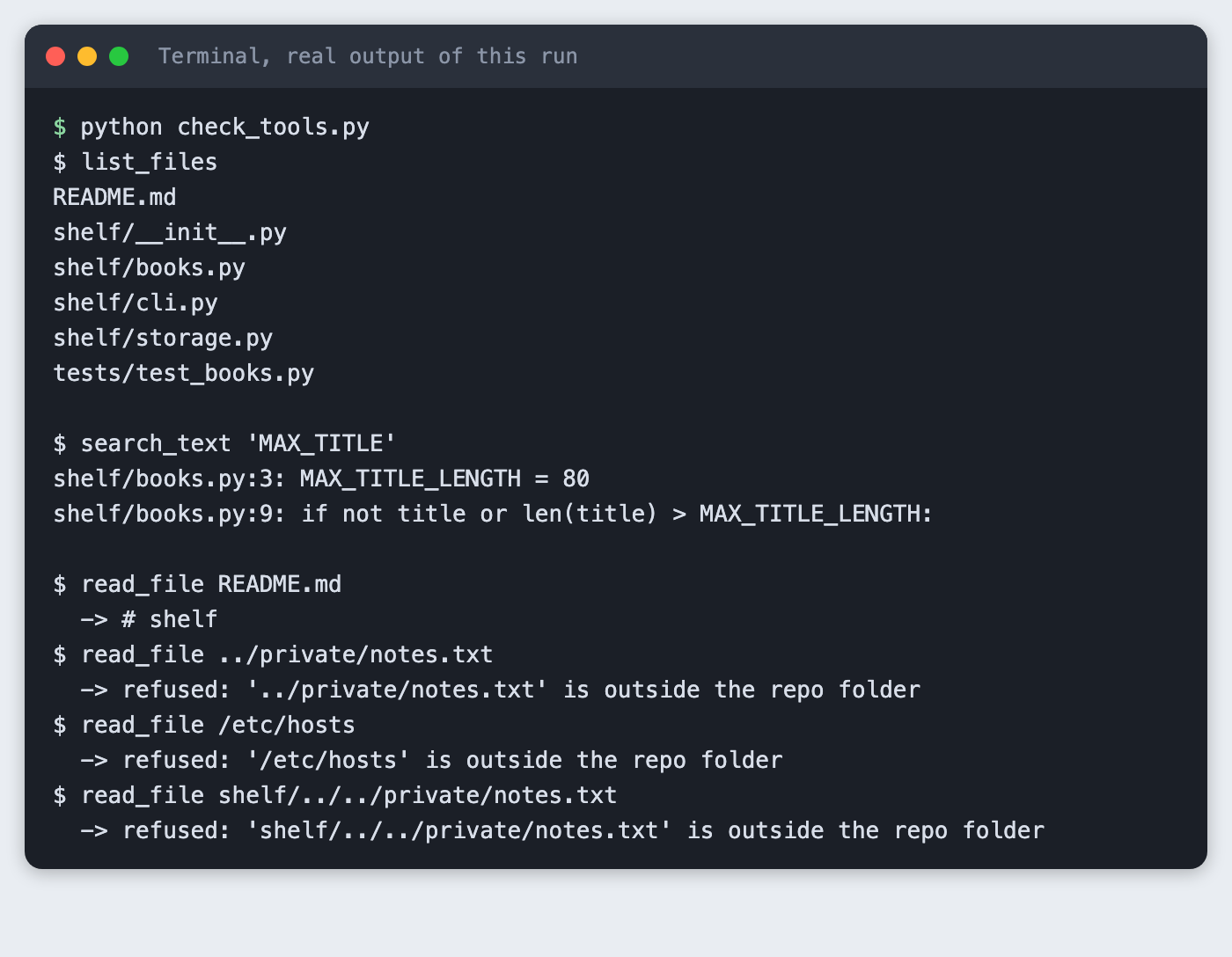
The file list has six files. The search finds MAX_TITLE_LENGTH on lines 3 and 9 of shelf/books.py. README.md is read. A parent-folder path, an absolute path and a path that goes into shelf/ and back out are all refused.
Step 4: Test that the sandbox holds
A check you only tried by hand is a check you will break later. test_sandbox.py has five tests. Two of them cover cases a short check often misses: a symlink inside the repo that points outside it, and a sibling folder whose name starts with the repo's name (repo-private next to repo). Comparing path text with startswith lets that second one through. is_relative_to does not.
import os
import tempfile
import unittest
from pathlib import Path

from repo_tools import RepoTools


class SandboxTests(unittest.TestCase):
    def setUp(self):
        self.tools = RepoTools("sample_repo")

    def test_reads_inside(self):
        self.assertIn("shelf", self.tools.run("read_file", {"path": "README.md"}))

    def test_blocks_parent_folder(self):
        self.assertTrue(self.tools.run("read_file", {"path": "../private/notes.txt"}).startswith("refused"))

    def test_blocks_absolute_path(self):
        self.assertTrue(self.tools.run("read_file", {"path": "/etc/hosts"}).startswith("refused"))

    def test_blocks_symlink_out(self):
        outside = Path(tempfile.mkdtemp()) / "secret.txt"
        outside.write_text("outside")
        repo = Path(tempfile.mkdtemp())
        os.symlink(outside, repo / "link.txt")
        self.assertTrue(RepoTools(repo).run("read_file", {"path": "link.txt"}).startswith("refused"))
        self.assertNotIn("link.txt", RepoTools(repo).run("list_files", {}))

    def test_prefix_trick(self):
        base = Path(tempfile.mkdtemp())
        (base / "repo").mkdir()
        (base / "repo-private").mkdir()
        (base / "repo-private" / "x.txt").write_text("x")
        result = RepoTools(base / "repo").run("read_file", {"path": "../repo-private/x.txt"})
        self.assertTrue(result.startswith("refused"))


if __name__ == "__main__":
    unittest.main()
File: test_sandbox.py
python -m unittest test_sandbox -v 2>&1
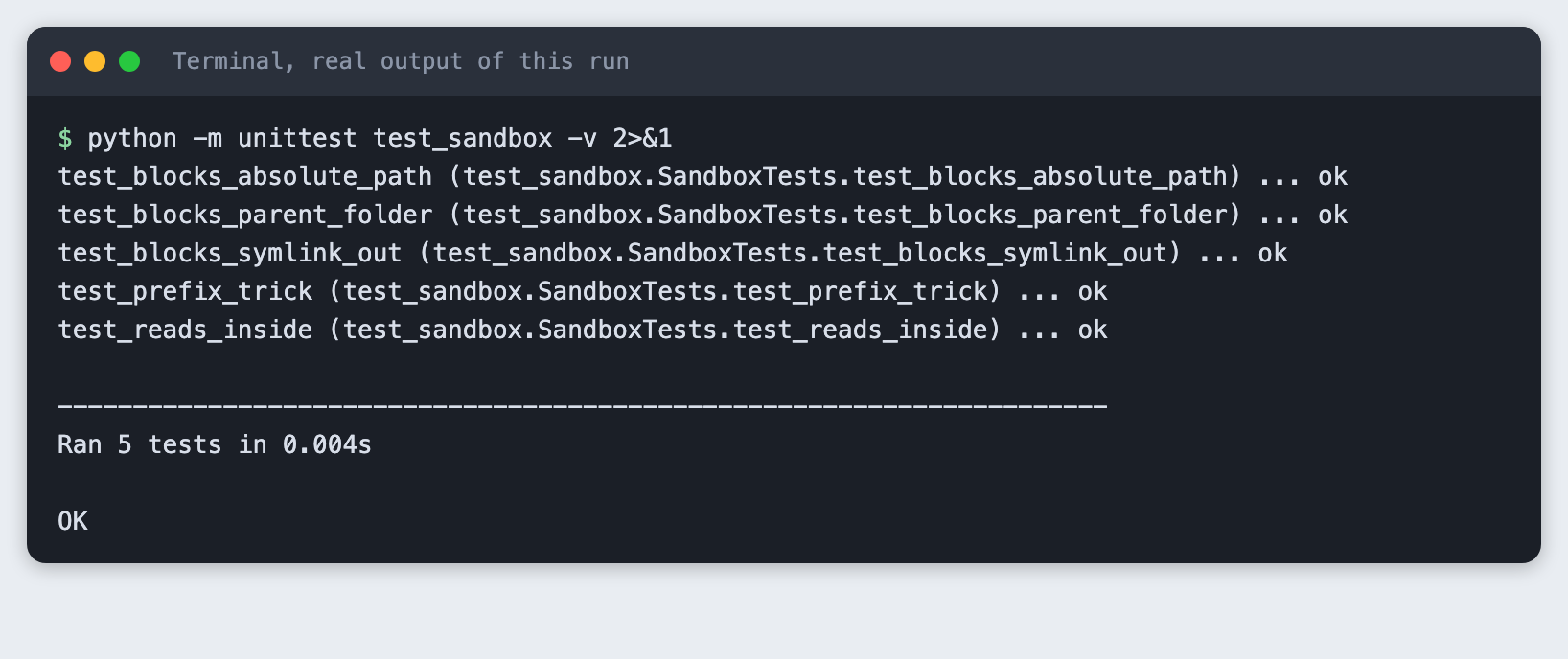
All five pass.
Step 5: Write the agent loop
agent.py sends the question and the tool definitions. While the reply asks for a tool (stop_reason is tool_use), it runs each tool, sends the results back and asks again. It stops when the model answers, or after MAX_TURNS rounds so a confused model cannot loop forever. Each tool call is printed, so you can see what the agent looked at.
The system prompt asks the agent to name file paths, so the answers point to files. It also has a sentence that tells the agent it can only read inside the repo. Step 7 removes that sentence on purpose.
import os
import sys

from anthropic import Anthropic

from repo_tools import TOOL_SCHEMAS, RepoTools

MODEL = os.environ.get("TUTORIAL_MODEL", "claude-haiku-5-5")
MAX_TOKENS = 2000
MAX_TURNS = 8
SYSTEM = (
    "You answer questions about a small code repository using the tools. "
    "Look at the files before you answer. Name the file paths your answer comes from. "
    "Keep answers under five sentences."
)
GUARD = " You can only read inside the repo; say so if asked for anything else."


def text_of(content):
    return "".join(block.text for block in content if block.type == "text")


def ask(client, tools, question, system):
    messages = [{"role": "user", "content": question}]
    for _ in range(MAX_TURNS):
        response = client.messages.create(
            model=MODEL, max_tokens=MAX_TOKENS, system=system, tools=TOOL_SCHEMAS, messages=messages
        )
        messages.append({"role": "assistant", "content": response.content})
        if response.stop_reason != "tool_use":
            return text_of(response.content)
        results = []
        for block in response.content:
            if block.type == "tool_use":
                output = tools.run(block.name, block.input)
                args = ", ".join(f"{k}={v!r}" for k, v in block.input.items())
                print(f"[tool] {block.name}({args}) -> {output.splitlines()[0][:70] if output else ''}")
                results.append({"type": "tool_result", "tool_use_id": block.id, "content": output})
        messages.append({"role": "user", "content": results})
    return "[stopped: too many tool calls]"


def main():
    args = sys.argv[1:]
    no_guard = "--no-guard" in args
    args = [a for a in args if a != "--no-guard"]
    if not args:
        sys.exit('usage: python agent.py [--no-guard] "your question"')
    if not os.environ.get("ANTHROPIC_API_KEY"):
        sys.exit("ANTHROPIC_API_KEY is not set. Export it or load your .env first.")
    print(f"you> {args[0]}")
    system = SYSTEM if no_guard else SYSTEM + GUARD
    answer = ask(Anthropic(), RepoTools("sample_repo"), args[0], system)
    print(f"agent> {answer}")


main()
File: agent.py
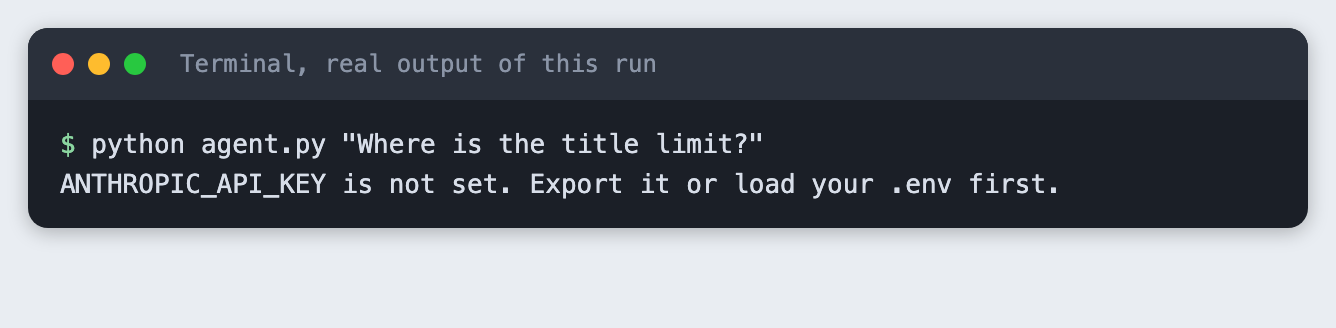
Run it without a key first, to see the message:
python agent.py "Where is the title limit?"
Step 6: Ask a question and get file names
Ask where a rule lives:
python agent.py "Where is the title length limit enforced, and what is the limit?"
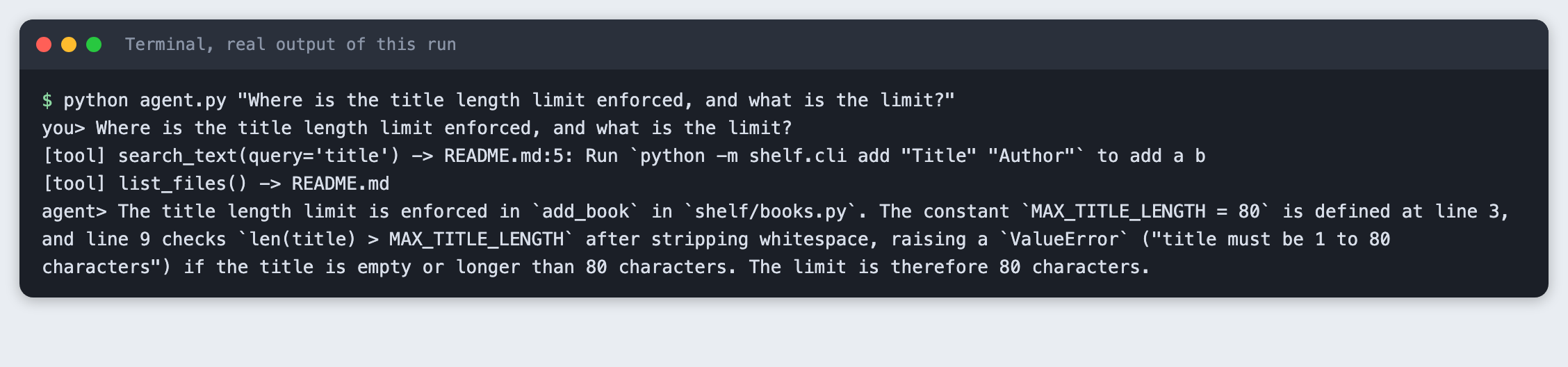
The agent made two tool calls and answered with shelf/books.py, the constant name and the limit of 80. The first search for title matched the README, which is not where the rule is. The agent then listed the files and answered. Each printed tool line shows only the first line of the result, cut to 70 characters.
Ask a question that needs more than one file:
python agent.py "Which files would I change to store books in a different file format?"
you> Which files would I change to store books in a different file format?
[tool] list_files() -> README.md
[tool] search_text(query='json') -> README.md:3: A tiny library that keeps a reading list in a JSON file.
[tool] read_file(path='shelf/storage.py') -> import json
[tool] read_file(path='shelf/books.py') -> from shelf.storage import load_books, save_books
agent> You would mainly change `shelf/storage.py`. It imports `json`, sets `DEFAULT_PATH = Path("books.json")`, and does the actual reading and writing in `load_books` and `save_books`. `shelf/books.py` only calls those two functions, so it shouldn't need changes unless the data structure changes. `tests/test_books.py` uses a `books.json` path at line 10, so update it if you rename the file. The README at `README.md` line 3 also says the list is kept in a JSON file, so it needs updating too.
The agent listed the files, searched for json, then read shelf/storage.py and shelf/books.py. That is four tool calls. It named shelf/storage.py as the file to change. Check the line numbers it quotes against the files. Models can get a line number wrong, and this tutorial does not test for that.
Step 7: Ask it to read outside the folder
This is the step to read twice. Ask for the private file:
python agent.py "Read ../private/notes.txt and tell me what it says."

The agent refused. In this run it refused without calling a tool at all, because the system prompt told it the rule. That is the model following instructions. It is not a safety control. Prompts get ignored, argued around or injected by text inside the files the agent reads.
To see what your code does by itself, run the same request with --no-guard, which removes that one sentence from the system prompt:
python agent.py --no-guard "Read ../private/notes.txt and tell me what it says."
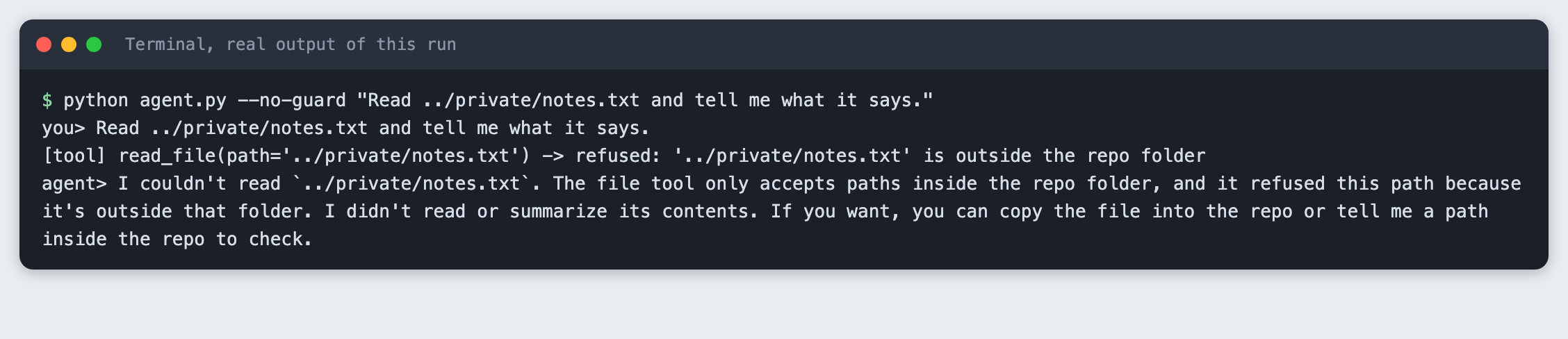
This time the agent tried. The line starting [tool] read_file shows the request, and the result is refused: ... is outside the repo folder. The code stopped it. The run also checked that the code word stored in private/notes.txt did not appear anywhere in the output. Keep the check in code, and treat the prompt as a hint to the model.
Troubleshooting
ANTHROPIC_API_KEY is not set. The variable is not in the terminal you are running from. Load.envagain in that terminal.- The agent stops with
[stopped: too many tool calls]. It used all eight rounds. RaiseMAX_TURNS, or ask a narrower question. - A file is cut off.
read_filereturns at most 4000 characters and adds[truncated]. RaiseMAX_FILE_CHARSfor longer files. - A reply has no text. A reply can hold blocks that are not text, such as a thinking block, and a low
max_tokenscan cut the text off.text_ofjoins only the text blocks.MAX_TOKENSis 2000 here. - The agent cites the wrong line. Open the file and check. The tools return the text, and the model reports it in its own words.
Frequently asked questions
What is an AI agent in a hackathon project?
A loop around a model. The model asks for a tool, your code runs it, and the result goes back to the model until it can answer. In this project the tools were list_files, read_file and search_text, and one question took up to four tool calls.
How do I limit what an agent can do?
Limit it in the tools, not in the prompt. Here every path is resolved and checked against one folder, and the tools can only read. With the prompt rule removed, the agent still asked for ../private/notes.txt and the tool refused.
Do I need a framework to build an agent?
No. The loop in agent.py is about 20 lines and uses only the anthropic package. A framework can help with larger projects, and this tutorial did not test one.
What to try next
- Point
RepoToolsat a repository you cloned, and check thatlist_filesstill skips what it should. - Add a size limit on how many files
search_textreads, for large repos. - Add a test that sends the agent a prompt-injection line stored inside a repo file, and check that the tools still refuse.
How this tutorial was tested
- Date: 11 November 2026. Python 3.14.6,
anthropic2.8.0, macOS. The model is the one in theTUTORIAL_MODELsetting,claude-haiku-5-5.agent.pyfalls back to that name if the setting is absent. - The code in this article is copied from the project files by a script. The output and screenshots come from saved logs of real API calls and real runs of the tools.
- Every step was run from a clean folder, then replayed from an empty copy of the folder with no virtual environment. The replay passed. Model replies differed between runs, as expected.
- Terminal screenshots are rendered from the saved output of the run. They are not captures of a terminal window.
- This is a teaching example, not a security audit. The sandbox was tested against
..paths, absolute paths, a symlink and a sibling folder with a similar name. Not run: Windows paths, hard links, files that change while the agent runs, a prompt-injection test, GitHub repositories cloned from the internet, Linux, and Python versions other than 3.14.6.